Windows drivers for old E-MU audio
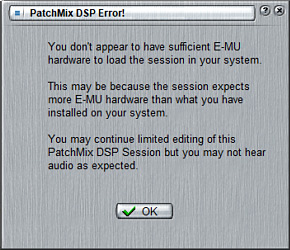
You don’t appear to have sufficient E-MU hardware to load the session in your system.
Fix for E-MU 0404, 1010, 1212m, 1616, 1616m, 1820, 1820m audio interfaces which do not work on Windows 10 1903 (fix may work with above versions too).
How to use
- Go to repository
- Uninstall your driver
- Uninstall PatchMix DSP
- Reboot
- Install driver from this repo (unzip and run setup.exe)
- Install PatchMix DSP
- Reboot
- (additional, only if you have problems with asio after install, I don’t investigate this problem) you can
try files
reg-asio-syswow64.cmdandreg-asio.cmdplaced in “just in case” folder or reg edit:
win+r -> regedit -> go to
                HKEY_LOCAL_MACHINE\SOFTWARE\WOW6432Node\Microsoft\Windows\CurrentVersion\Run -> right-click
                AsioThk32Reg -> modify -> change CTASIO.DLL to CTASIO64.DLL -> Ok -> reboot
Files:
EmuPMX_PCApp_US_2_20_00.exe - original PatchMix DSP
installer [virustotal].
EmuPMX_PCDrv_US_2_30_00_BETA_PATCHED.7z - driver
installer with replaced ctoss2k.sys file (taken from updated Creative X-Fi driver) [virustotal].
There is 1 match on virustotal so you can download e-mu files by your own, unzip and replace ctoss2k.sys (placed in “just in case” folder or download Creative X-Fi drivers and take from there).
Credits and links
Solution is not mine. Many thanks to all guys from web participating in solving this issue with E-MU audio interfaces. Additional info can be found at:
- https://www.kvraudio.com/forum/viewtopic.php?t=529349 (en)
- https://forum.ixbt.com/topic.cgi?id=90:1266-38 (ru)
- https://rmmedia.ru/threads/127226/ (ru)
- https://web.archive.org/web/20200922205207/https://xrvsx.ru/devices/e-mu-1616m-windows-10-x64-version-1903.html (ru)
- https://www.kvraudio.com/forum/viewtopic.php?f=16&t=371831&start=180 (en)
- https://answers.microsoft.com/en-us/windows/forum/all/the-sound-card-e-mu-1616m-does-not-work-with-the/44f13d28-54de-47c2-b058-e72ab0d4113a (en)